JavaScript executes on a single thread. This is not a limitation of NodeJs; it is a property of JavaScript itself. One call stack. One instruction stream. One thing executing at a time.
Yet NodeJs routinely handles tens of thousands of concurrent connections. The reason this works is simple: most backend work is not computation. It is waiting.
Typical backend workloads spend most of their time blocked on I/O:
- Database queries
- HTTP requests
- File system access
- Network communication, etc.
All these operations are delegated to the operating system. While the OS waits, JavaScript continues executing other callbacks. When results arrive, NodeJs schedules them back onto the event loop.
How NodeJs Actually Executes Code
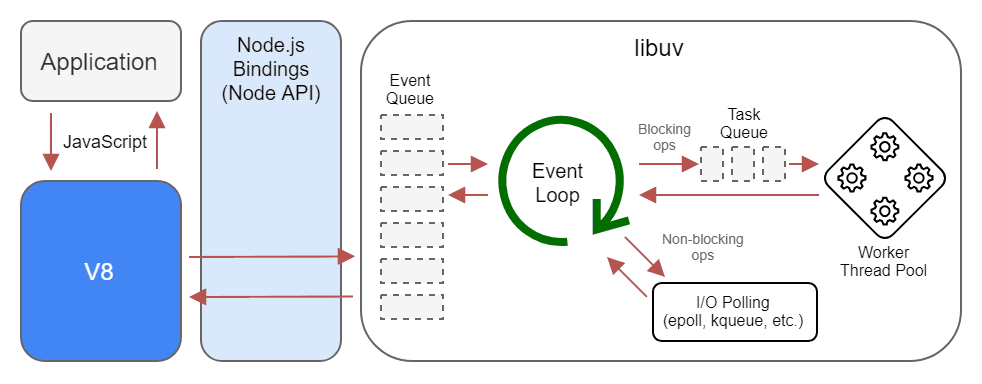
NodeJs consists of three conceptual layers:
- The call stack, where JavaScript executes
- The event loop, which schedules callbacks
- libuv, which interfaces with the operating system
JavaScript code always runs on the call stack on the main thread. There is exactly one call stack. JavaScript never runs in parallel across multiple stacks. If the call stack is busy, nothing else can run.
The Event Loop decides what runs next. Its main responsibility is orchestration: deciding when queued callbacks, promises, and timers are pushed onto the call stack once the stack becomes free. It is not a worker; it does zero computation. Think of it as a traffic controller.
libuv is the bridge between NodeJs and the operating system. It handles non-blocking I/O and maintains a thread pool for operations that cannot be done asynchronously at the OS level (filesystem access, DNS lookups, etc).
These background threads can work in parallel, but they never execute JavaScript. Their only job is to notify the event loop when the given work is complete.
This model works well for typical I/O tasks, but limitations start to show up the moment a CPU-bound task is introduced.
NodeJs is concurrent, not parallel.
It can manage many things at once.
It cannot compute many things at once.
Async programming prevents waiting for OS- or network-level tasks.
It does not provide parallel computation.
CPU-Bound Work Blocks Everything
Consider a naive Fibonacci implementation:
function fib(n) {
  if (n <= 1) return n;
  return fib(n - 1) + fib(n - 2);
}

fib(45);
This function performs pure computation. No I/O or anything async is happening here.
This means this function will completely execute on the main thread.
So while this function runs, any pending tasks on the main thread will be blocked until it finishes.
Any HTTP requests, Promises, or callbacks won’t be handled; it will literally block the main thread execution and will occupy the entire call stack, and your server is effectively frozen until the computation completes.
Using async or await changes nothing here, because there is nothing to await.
Worker Threads: Parallelism for JavaScript
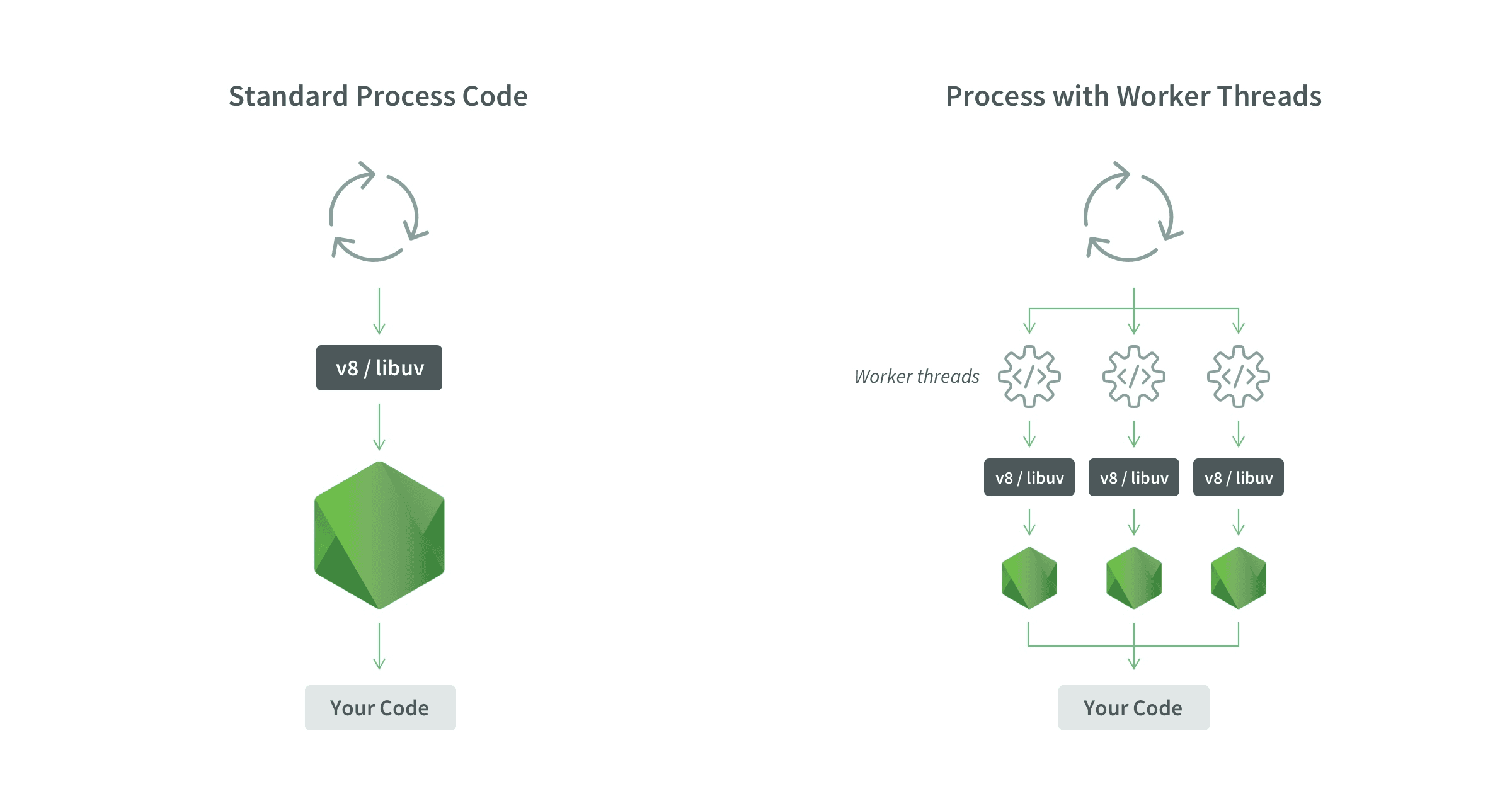
Worker Threads exist to solve exactly this problem.
A worker thread provides its own:
- V8 instance
- event loop
- memory space
- operating system thread
In other words, a worker is an isolated JavaScript execution environment running in parallel within the same process (not a separate process).
The main thread offloads heavy, CPU-bound computation to workers and continues handling requests without blocking. Workers execute in parallel on separate CPU cores, not time-sliced on the same thread. Results are sent back to the main thread via message passing, transferable objects, or shared memory (for example, SharedArrayBuffer with Atomics).
This is parallelism, not concurrency.
Data Transfer Between Threads
Workers communicate using structured cloning. Data is copied, not shared.
Workers do not share the JavaScript heap by default; there is no implicit data race. Communication is explicit, which keeps the model predictable but also means serialization or synchronization costs must be considered.
Copying large objects is expensive. The cost grows with payload size.
SharedArrayBuffer enables shared memory, but introduces synchronization complexity and race conditions.
A Simple Benchmark
Single-Threaded Execution
const fib = (n) => (n <= 1 ? n : fib(n - 1) + fib(n - 2));

console.time("single");

for (let i = 0; i < 5; i++) {
  console.log(fib(45));
}

console.timeEnd("single");
Observed runtime: ~70 seconds.
All computations execute sequentially.
Worker Thread Execution
main.js
const { Worker } = require("worker_threads");

console.time("workers");

let completed = 0;

for (let i = 0; i < 5; i++) {
  const worker = new Worker("./worker.js");

  worker.on("message", (result) => {
    console.log(result);
    completed++;
    if (completed === 5) {
      console.timeEnd("workers");
    }
  });
}
worker.js
const { parentPort } = require("worker_threads");

function fib(n) {
  if (n <= 1) return n;
  return fib(n - 1) + fib(n - 2);
}

parentPort.postMessage(fib(45));
Observed runtime: ~20 seconds.
Multiple CPU cores execute computations simultaneously. The main thread remains responsive throughout.
Worker Creation Is Not Cheap
Spawning a worker requires:
- Initializing a new V8 runtime
- Allocating memory
- Setting up an execution context
Since each worker runs on a separate operating system thread and competes for CPU cores, creating a worker per request is a mistake. The overhead will cause performance issues.
In production, a limited number of workers are initialized (less than the number of CPU cores) and reused over and over.
The Worker Pool Pattern
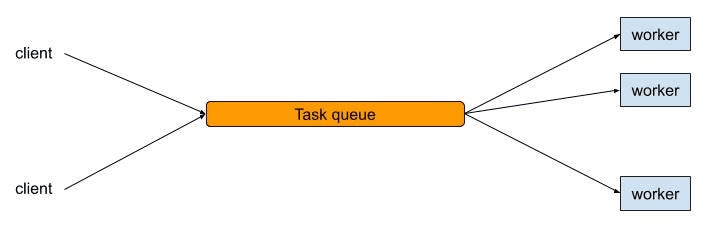
A worker pool maintains a fixed number of long-lived workers created at startup.
Typical flow:
- Dispatch tasks to idle workers
- Queue tasks when all workers are busy
- Reuse workers continuously
This bounds resource usage and stabilizes latency.
Minimal Worker Pool Example
main.js
const { Worker } = require("worker_threads");

const POOL_SIZE = 4;
const workers = [];
const queue = [];

class WorkerPool {
  constructor(id) {
    this.busy = false;
    this.worker = new Worker("./worker.js");

    this.worker.on("message", (result) => {
      console.log(`Worker ${id}:`, result);
      this.busy = false;
      this.next();
    });
  }

  run(task) {
    this.busy = true;
    this.worker.postMessage(task);
  }

  next() {
    if (queue.length > 0) {
      this.run(queue.shift());
    }
  }
}

for (let i = 0; i < POOL_SIZE; i++) {
  workers.push(new WorkerPool(i));
}

function assign(task) {
  const idle = workers.find((w) => !w.busy);
  if (idle) idle.run(task);
  else queue.push(task);
}
worker.js
const { parentPort } = require("worker_threads");

function fib(n) {
  if (n < 2) return n;
  return fib(n - 1) + fib(n - 2);
}

parentPort.on("message", (n) => {
  parentPort.postMessage(fib(n));
});
The Cluster Module: Process-Level Parallelism
Before Worker Threads existed, NodeJs introduced the cluster module to leverage multiple CPU cores.
The cluster module works by spawning multiple processes, not threads. Like Worker Threads, Each process has Its own :
- V8 instance
- event loop
- memory space
All worker processes listen on the same server port, while the operating system load-balances incoming connections between them.
This enables true parallelism by running multiple NodeJs processes across CPU cores. However, processes do not share memory. Communication between them happens via IPC, which is significantly more expensive than thread messaging.
Cluster is best suited for scaling I/O-bound servers across cores. It does not solve CPU-bound work inside a single request, because each request is still handled by a single-threaded event loop within a process.
In practice:
- cluster scales request throughput
- worker threads scale CPU-bound computation
Cluster Example
const cluster = require("cluster");
const http = require("http");
const os = require("os");

const numCPUs = os.cpus().length;

if (cluster.isPrimary) {
  for (let i = 0; i < numCPUs; i++) {
    cluster.fork();
  }
} else {
  http
    .createServer((req, res) => {
      res.end(`Handled by PID ${process.pid}`);
    })
    .listen(3000);
}
Each worker process runs its own event loop and handles requests independently.
The OS distributes incoming connections across processes.
Workers and Clusters both are different and solve different problems.
Practical Use Cases
Worker threads are appropriate for any CPU-heavy tasks. They are generally used for:
- Image resizing and video processing
- Cryptographic hashing
- Compression and decompression
- Large dataset transformations
- Machine learning inference
They are overkill and often harmful for tasks like:
- Database access
- HTTP requests
- File reads
- Simple request handlers
I/O already executes outside the JavaScript thread.
Key Takeaways
- JavaScript executes on a single main thread
- Async programming prevents waiting, not blocking
- CPU-bound work freezes the event loop
- Worker Threads enable real parallel computation
- Cluster enables process-level parallelism for I/O scaling
- Worker pools are essential for production systems
- Correct workload placement determines scalability